
What are Desktop AI Agents? Why Manus Broke the Browser Safety Model

TL;DR
Manus just moved its AI agent off cloud servers and onto your local machine, letting agents read files, launch apps, and execute code directly with your explicit approval before each action.
This isn’t just computer use. It’s the first consumer-grade agent that runs natively on your device, sidestepping the browser sandbox entirely.
Browser-based agents looked safe because they were constrained. Desktop agents look dangerous because they’re not, and that’s forcing the industry to solve security problems it’s been avoiding.
When you give an AI agent access to your desktop, something shifts. It’s not about capability anymore. It’s about trust.
On March 16, 2026, Manus released My Computer, a desktop application that does something the industry’s been too nervous to do at scale: it gives an AI agent direct access to your file system, running applications, and command-line tools. Not through a web browser. Not through an API proxy. Directly. With explicit approval gates, yes. But direct.
This matters because browser-based agents have been built on a lie. The lie isn’t malicious. It’s just incomplete. The lie is: “Our agent can’t hurt you because the browser sandbox contains it.” But that’s only true if you never authenticate in your browser, never store credentials, never keep sensitive data in plaintext files. The browser sandbox protects the browser. Not you.
Manus just demolished that assumption.
The Sandbox Was Never the Point
Let’s start with what most people get wrong about the recent explosion in computer-using AI. When GPT-5.4 native computer use arrived weeks ago, people said, “Finally, an AI that can use a GUI.” That’s half right. What they missed is that using a GUI through a browser is a fundamentally different problem than using your actual computer.
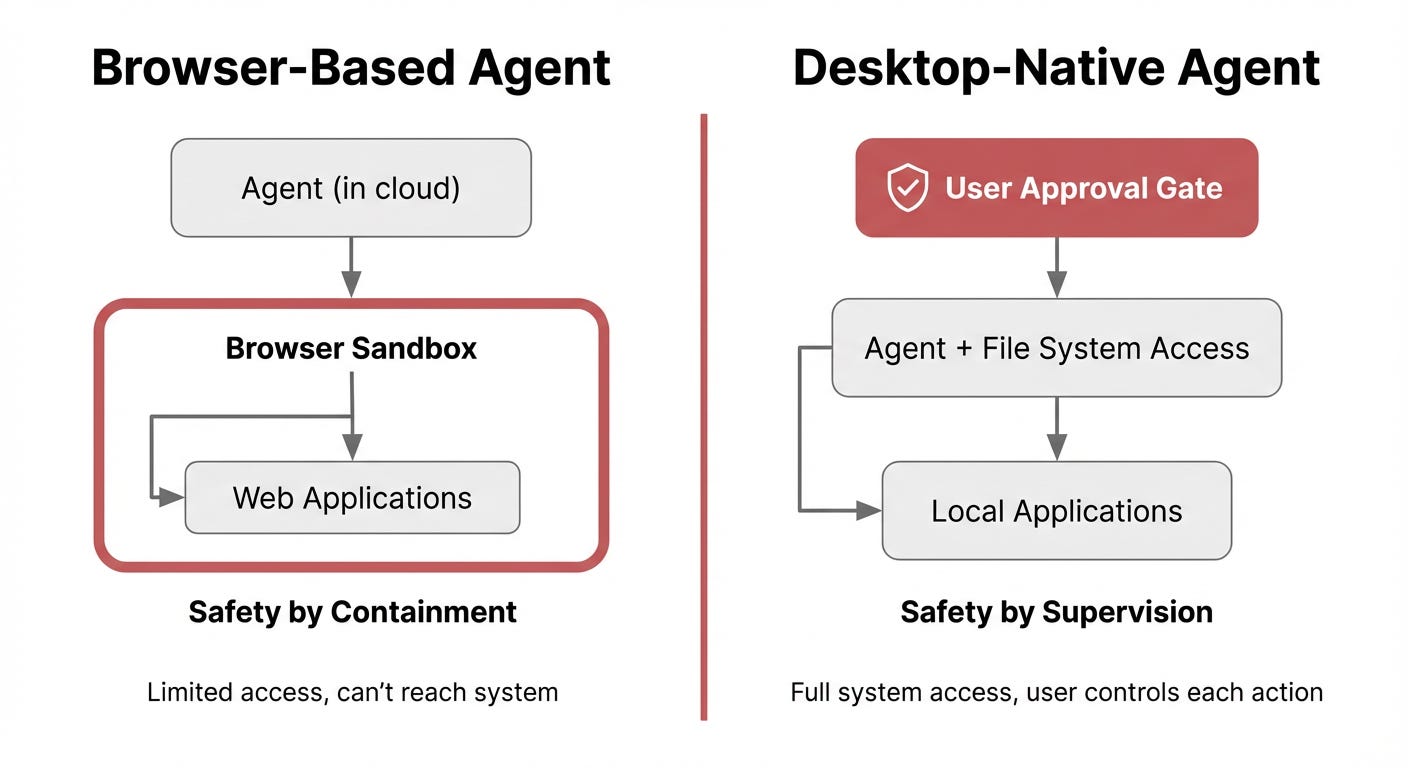
Browser-based agents operate in a constrained environment. They click links, fill forms, navigate websites. They’re powerful for automation, but they’re operating in an isolated tab. No access to your Downloads folder. No access to your SSH keys. No ability to run local scripts. The browser boundary is real, and it matters.
Desktop agents don’t have that boundary. They operate with your user permissions. They see your files. They can execute programs. They can modify your system. A compromised browser-based agent is a bad day. A compromised desktop agent is a catastrophe.
So when Manus announced My Computer, the industry’s first reflex wasn’t excitement. It was silence. Because suddenly, the containment strategy that’s been working for the last six months stops working.
What Manus’s My Computer Actually Does
Let me be precise about what changed. The Manus agent can now:
Read, analyze, and edit local files without uploading them to a server
Launch and control applications installed on your machine
Execute command-line instructions, including coding tasks
Access your local GPU for inference or model training
Create recurring automated routines (your Downloads folder tidied every morning, weekly reports generated locally)
Create and build complete applications using Python, Node.js, Swift, or other tools already installed
Every terminal command requires your explicit approval. You choose between “Allow Once” (review each action) or “Always Allow” (preapprove trusted tasks). The agent itself runs on your device, not in a cloud.
This is desktop-native execution. Not cloud agents with desktop access. Not browser extensions with elevated privileges. An agent built to live on your machine.
The Differentiation That Matters
Here’s where this diverges sharply from what GPT-5.4 offers. GPT-5.4 native computer use is screen-based. It observes a desktop, moves a cursor, clicks windows, reads what appears on screen. It’s sophisticated automation of visual input, but it’s fundamentally reactive. It sees what’s rendered and responds to it.
Manus My Computer is programmatic. It doesn’t observe your desktop. It directly invokes your file system and command-line interface. This is faster, more reliable, and more powerful. But it’s also fundamentally riskier. A misclick in a GUI is reversible. A miswritten shell command can delete your hard drive.
Manus’s response to this risk isn’t to sandbox the agent (they can’t, it’s on your device). Their response is to require explicit approval gates. The approval mechanism is the control layer. It’s you, not the system architecture, that prevents catastrophe.
This is the opposite of the browser-based safety model. Browser agents are safe because they can’t access your system. Desktop agents from Manus are safe because you can block them from accessing your system in real time.
These are not equivalent. One is prevention. One is supervision.
Why This Threatens the Entire Browser-Agent Narrative
The silence in the industry isn’t random. It’s about market positioning.
For the last three years, every major AI lab has pushed the browser-agent narrative hard. “Safe automation.” “Controlled environments.” “The agent never touches your sensitive data.” That narrative is worth billions in enterprise contracts. Insurance companies love it. Security teams love it. Compliance officers love it.
Manus just threw a wrench into that narrative by building something that works better than browser agents for a huge class of problems, and it requires users to accept direct agent access to their machines.
They’re not saying it’s safer. They’re saying it’s worth the risk.
That distinction is radioactive in an industry that’s built its entire sales strategy on risk elimination. If Manus’s model succeeds, every other company in the agent space will face the same problem: your safety story just became your limitation story.
Consider what happens if Manus grows to 100,000 active users and the agent’s average success rate on complex tasks is 85% while browser-agent success rates stay at 45%. Approval gates or not, users will migrate. The safer-than-desktop argument evaporates when desktop agents just work better.
The Real Misconception: Local Isn’t the Same as Safe
People conflate two different things. “Local” makes something faster, more private, and more powerful. It doesn’t make it safe.
If a Manus agent is compromised by a jailbreak, or if the Manus backend is itself malicious, or if a user’s machine is already compromised by malware, the approval gates mean nothing. You’re approving instructions you can’t fully understand. A sophisticated prompt injection could trick an agent into requesting permissions that seem benign but aren’t.
The browser-agent vendors have sold the idea that the sandbox is your protection. It is, but it’s also a limitation. Manus is selling the opposite: raw capability with a human-in-the-loop approval mechanism as your protection. That’s not safer. It’s just a different risk model.
And here’s the uncomfortable part: for many tasks, the Manus model might actually work. Not because approval gates are fail-safe. But because the cost of agent failure is lower than the cost of agent limitations. If your agent fails to organize your Downloads folder correctly, you manually organize it. If your agent fails to execute a complex coding task, you review the code.
The browser agent that can’t access your files doesn’t just fail safely. It fails completely. It never tries.
What Doesn’t Work Yet
Manus is being positioned as the answer to “autonomous AI on your personal device.” It’s not. Not yet.
The approval gate model scales poorly. Approving individual terminal commands works for occasionally running background tasks. It doesn’t work for long-running agent processes that need to make hundreds of decisions. At what point does the approval interface become a bottleneck that negates the value of the agent?
Manus hasn’t solved the agentic trust problem. They’ve deferred it to you. That’s an honest move, but it’s not a solution. It’s a recognition of the problem.
The agent also can’t learn from mistakes in ways that reduce future failures without human intervention. Every error requires either approving a corrective action or manually fixing it. There’s no feedback loop that improves the agent over time.
And the pricing model starting at $20 monthly for a subscription service sits awkwardly next to OpenClaw, the open-source, free alternative that runs on your machine with fewer approval gates and no vendor lock-in. If Manus’s agent is genuinely better, it has to be substantially better than free to survive.
The Implication Nobody’s Saying Out Loud
Manus just redefined what a production agent looks like. Not safer. Not more private, necessarily (data still flows to Manus servers for inference). Just more capable.
If that capability advantage is real, the browser-agent strategy becomes a transitional phase. A stepping stone while the industry figured out how to prevent immediate disasters. Once agents get smarter, once approval gates become sophisticated enough to handle truly autonomous tasks, once users get comfortable with agents having machine access, desktop agents don’t just beat browser agents. They make them obsolete.
That’s what’s scary. Not that Manus’s desktop agent will cause a catastrophe. But that it might work well enough that everyone else has to build one, and the industry has to rethink what “safe AI” even means when the AI runs on your machine with your credentials.
The sandbox wasn’t safety. It was just distance.
References and Further Reading
Meta’s Manus launches desktop app to bring its AI agent onto personal devices - CNBC reporting on the My Computer launch and Meta’s acquisition strategy.
Introducing My Computer: When Manus Meets Your Desktop - Official Manus blog post detailing the My Computer feature set and approval mechanisms.
Meta’s Manus launches ‘My Computer’ to turn your Mac into an AI agent - 9to5Mac technical breakdown of desktop agent capabilities across macOS and Windows.
How Computer-Using Agents can be leveraged in cyber attacks - Push Security analysis of attack surfaces and security risks from desktop agent access.
Practical Security Guidance for Sandboxing Agentic Workflows and Managing Execution Risk - NVIDIA technical guidance on isolation strategies and execution risk management for agentic systems.
If this helped you think differently about the tradeoffs between desktop and browser agents, share it with someone building AI systems.